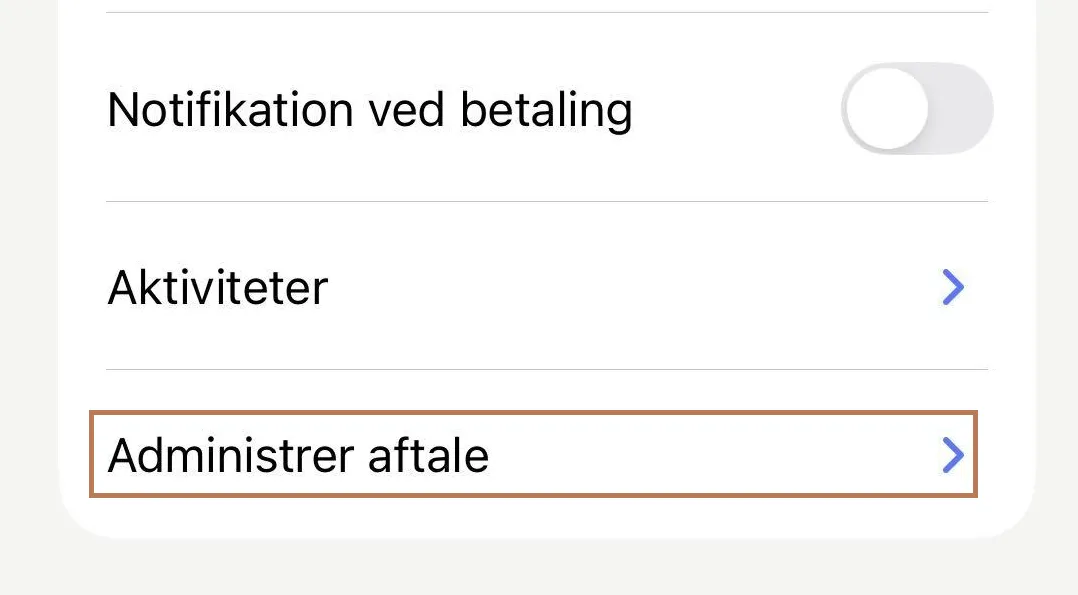
In collaboration with MobilePay, we have looked at the user journey that begins with “Administrer aftale” in the app. If you tap the button today, you may be offered up to two options:
- Stop the agreement, directly from the user interface
- Go to the organization – where the URL in practice points to the gateway provider, i.e. OnlineFundraising
The good solution balances giving the donor control over the agreement and at the same time ensuring that the decision is completely well thought through. For MobilePay, it has been important that we found a solution, where you can easily and simply stop the agreement, without the option necessarily being offered in the app.
With the new solution, the user journey can be designed to better suit the individual organization. When the donor presses the “Administrer aftale” button, a separate page will load outside the app in the future.
From here, the donor journey can be adapted to your needs. Let’s go through the options together.
The minimal solution
Right out of the box, the donor is directed to a separate page with the organization’s logo and a form containing basic information about the agreement (amount, frequency and date of the next transfer) as well as the option to stop the agreement. Button color and so on, will follow the organization’s default settings (in Formbuilder).
This solution meets MobilePay’s requirements and ensures that all agreements can be changed by the donor. But ideally, we want to do a little more, right?
The good solution
If the user journey is to be improved – from the organization’s point of view – the form in question should instead be embedded on your website.
The form is embedded in the same way as for renewing a payment method. You simply insert the script in question and then you can focus on the communicative part of the landing page. What does it mean for you, if a donor cancels their agreement?
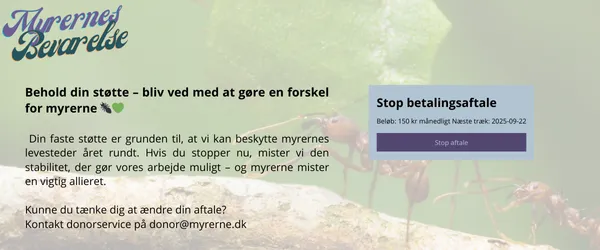
This gives you a chance to reiterate the organization’s purpose and visually remind donors of what the donation is for, next to the form. Here, you can also offer alternatives: Contact donor service if you want to downgrade or pause your agreement for a period of time. The goal is of course to minimize the number of donors who cancel.
Follow the guide here, if you want to create your won opage for this.
The golden rimmed solution
If you want to turn it up a nudge, then you can offer the donor the ability to adjust the agreement themselves: Lower the amount, pause the agreement or stop it completely. However, the options depend on you and the nature of the agreement. If it is a membership, you cannot lower the amount, as the rate is probably determined in your articles of association.
The option to terminate the agreement must be there in order for us to meet the requirements from MobilePay. However, if we are to offer other options, it must be tailored to your organization and the type of agreement in question – donation, membership, etc.
If you already have a so-called utility where the donor can terminate the agreement themselves, it can be used instead of the standard utility/form that we offer for this purpose.